

What is the biggest pain point of using AI for front-end development? It’s not that the code doesn’t work, but rather that the resulting interfaces all look exactly the same.
Centered headings, three cards per section, blue-to-purple gradients, a pure black background – whether you’re building a SaaS website or a personal blog, AI always creates interfaces with a distinct “AI-like” style. Do they look good? Not necessarily. Do they stand out? Definitely not.
Taste Skill is designed to solve this problem.

What is it?
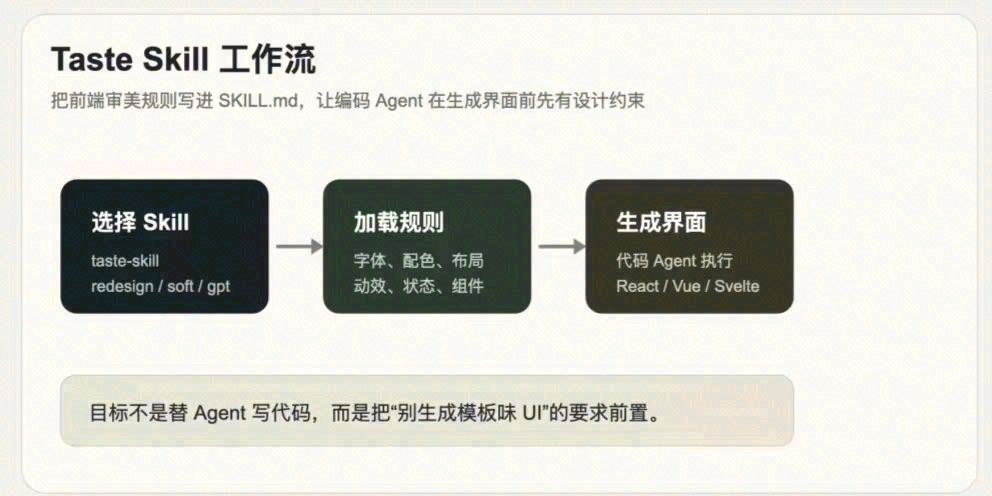
Taste Skill is neither a component library nor a UI framework. It’s a set of SKILL.md files specifically designed for AI coding tools such as Cursor, Claude Code, Codex, Gemini CLI, Lovable, and OpenCode.
The idea is simple: before the AI starts writing the code, you tell it what constitutes a good user interface.
The repository includes several key files:
taste-skill/SKILL.md– General aesthetic rulesgpt-tasteskill/SKILL.md– Focuses on layout variations and GSAP animationsredesign-skill/SKILL.md– Used to transform existing projectsimage-to-code-skill/SKILL.md– Generates reference images before writing the codeimagegen-frontend-web/SKILL.md– Generates reference images for web interfacesimagegen-frontend-mobile/SKILL.md– Generates reference images for mobile interfacesbrandkit/SKILL.md– Helps in exploring brand styles
How does it constrain AI?
It doesn’t rely on prompts; instead, it uses rule-based files. Here are a few examples:
Font and spacing: Clearly specify font families, container widths, and grid systems to prevent AI from using default values.
Anti-template rules: Avoid common AI choices like default blue-purple gradients, three-column layouts, and pure black backgrounds.
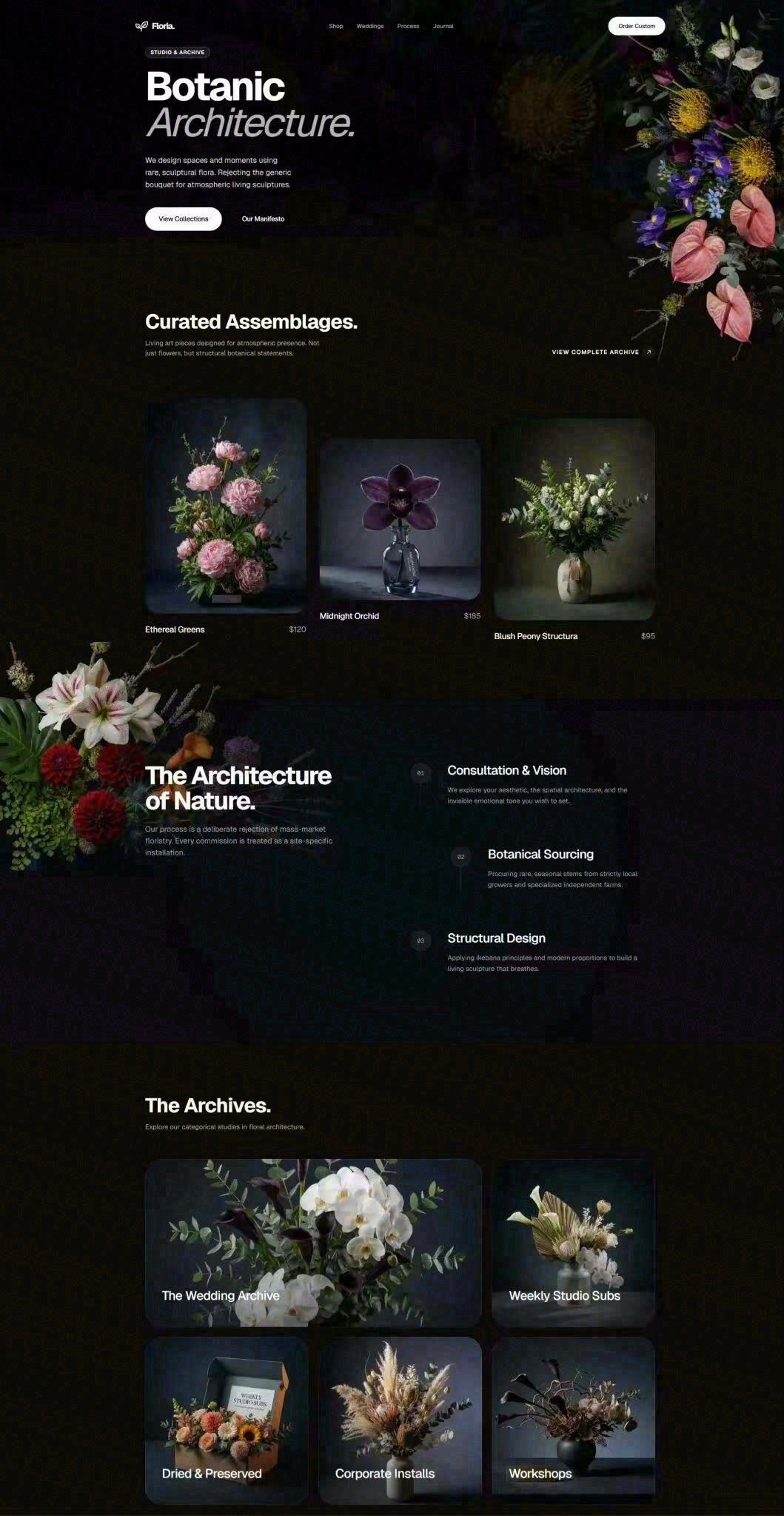
The image on the right shows the effect of Taste Skill: the layout is more organized, with proper whitespace and visual hierarchy. The left image is the default output from AI, while the right one follows the aesthetic guidelines.
State management: Essential states like loading, empty, error, hover, and active must be included. Many AI-generated interfaces lack feedback when the mouse is hovered over elements because the hover state is missing.
Animation standards: Use transform and opacity for animations to avoid inefficient layout changes (e.g., directly modifying width and height).
Dependency checks: Check the package.json file to avoid importing non-existent dependencies.
Behind the research
The project’s research/ directory contains controlled experiments from 2025. The findings are interesting: even with detailed prompts, AI models often overlook essential elements, format requirements, and length constraints.
This isn’t AI being lazy; it’s just that long contexts can distract the models. Taste Skill’s output-skill rules address these issues by specifying a complete and consistent output.
It’s important to note that these are internal project documents, not independent benchmark tests. They should be used as a reference for design decisions.
How to use it
All the SKILL.md files and usage tutorials are packaged on Quark Cloud Disk for one-time download:
Unzip the files and integrate them into your project as needed.
Real-world usage examples
I tried it in a few scenarios:
Scenario 1: Creating a landing page for a tool website. With Cursor, the result would always be a centered heading with three feature cards and a CTA at the bottom. Using Taste Skill, the AI made some layout changes, such as aligning the heading to the left, using an asymmetrical grid, and adding subtle background textures. It’s not stunning, but at least the interface doesn’t look like a template.
Scenario 2: Improving a backend management interface. Redesign-skill identified issues like inconsistent fonts, missing hover effects on buttons, and unstyled empty states, which were then fixed one by one without rewriting the entire project.
Scenario 3: Generating reference images for a multi-screen mobile interface. Imagegen-frontend-mobile created accurate references, making the design process much more precise than relying on text descriptions.
Who is it suitable for?
- Developers who use AI for front-end development and don’t want to manually adjust aesthetics every time.
- Independent developers without a designer who still want a decent-looking interface.
- Teams that need to maintain a consistent style when using AI.
- Those who want to improve the quality of existing projects without rewriting them from scratch.
Who is it not suitable for?
- People who don’t use AI for front-end development; this tool is not for manual use cases.
- Projects with extremely high design requirements; while it can help improve the quality, the final design still needs human expertise.
- Trying too many rules at once; choose the most relevant rules for your specific project.
Some notes:
- Beta phase: The official website indicates “Beta testing right now”; it’s recommended to test it on a small scale first.
- Not a designer substitute: It helps with the design process before coding, not replacing designer judgment.
- Reference images, no code generation: Skills like
imagegenonly create visual references; the actual code implementation is a separate step. - Image-driven approach: Setting clear visual goals first makes the AI-generated code more controllable.
In conclusion
The real value of Taste Skill lies in the fact that it turns aesthetic decisions into clear, engineering-based rules. Things like font selection, when to use fewer cards, how to avoid animation lag, and whether to include button and form states are all documented in the SKILL.md files. For those who frequently use tools like Codex, Cursor, and Claude Code for front-end development, it’s like having a set of portable design guidelines.
Project link: https://github.com/Leonxlnx/taste-skill
If you’re also struggling with the “template-like” interfaces created by AI, give Taste Skill a try.